
TikTok Profile Picture Downloader
Download full-size profile pictures from any TikTok user. Save avatars in HD — free, fast and no login required.
What is a TikTok Profile Picture Downloader?
Save any public TikTok user’s avatar in its full original size — no app, no sign-up, no quality loss.
A TikTok Profile Picture Downloader is an online tool that allows you to view and save the profile photo — also known as the avatar or display picture (DP) — of any TikTok user in full-size, high-definition quality. On the TikTok app, profile pictures are displayed as small circular thumbnails, making it impossible to see the full image or appreciate its original resolution.
TikTok does not provide a built-in option to download or enlarge profile pictures. This limitation is frustrating for users who want to see the full version of someone’s avatar. TokiClip's TikTok Profile Picture Downloader solves this problem by extracting the original uploaded image directly from TikTok’s servers, giving you access to the highest resolution version available.
The process is simple and fast — just paste any TikTok video link from the user whose profile picture you want to download, and TokiClip will automatically extract their full-size avatar. No registration, no app installation, and no fees are required. Pair this tool with our TikTok Video Downloader, Thumbnail Downloader or Photo Downloader to grab every part of a post.
Why Can’t You Download Profile Pictures Directly from TikTok?
The app only ever shows you a small, cropped circle — not the original photo.
TikTok’s app and website are designed to display profile pictures only as small, cropped circles within the interface. There is no zoom, enlarge or download option available for avatars. If you try to take a screenshot, you’ll get a low-resolution, circular crop that includes surrounding UI elements — far from the clean, full-size image you actually want.
Behind the scenes, however, TikTok stores the original uploaded image at a much higher resolution. A dedicated TikTok Profile Picture Downloader like TokiClip taps into this by extracting the full-size image directly, bypassing the small circular preview and giving you the complete, uncropped photo in its original quality.
How Is This Different from Taking a Screenshot?
Spoiler: a screenshot will never match the original uploaded image.
Screenshots of TikTok profile pictures come with several problems. The image is tiny — usually around 100 pixels in the app — and is cropped into a circle, cutting off parts of the original photo. Screenshots also capture the app’s interface elements around the avatar, requiring additional editing to clean up.
TokiClip's Profile Picture Downloader extracts the actual source image that was uploaded by the user. This means you get the full, uncropped, rectangular or square image at its maximum available resolution — typically several hundred pixels or more. The result is a clean, high-quality JPEG file ready for any use without additional editing.
Who Can Benefit from This Tool?
Fans, creators, marketers and journalists — anyone who needs a TikTok avatar at full size.
The TikTok Profile Picture Downloader serves a wide range of users. Fans and followers can save profile pictures of their favorite creators for personal collections or as phone wallpapers. Content creators can back up their own profile pictures across platforms or check how their avatar appears at full resolution.
Social media managers and brand teams can use it to verify creator identities, prepare influencer reports or create visual mood boards. Journalists and bloggers covering TikTok trends can download profile images for editorial use. Want to look up more details? Use our Username Search to view full public profile stats.
What Makes TokiClip's Profile Picture Downloader Unique?
Just a video link is enough — no need to dig up profile URLs.
Unlike other tools that require you to know the user’s exact profile URL, TokiClip works with any TikTok video link. Simply paste a link to any video posted by the user, and the tool automatically extracts their profile picture from the video metadata. This makes it incredibly convenient — you don’t need to navigate to someone’s profile page separately.
TokiClip also provides a full-size preview before downloading, so you can confirm it’s the correct image. The entire process happens in your browser with no data stored on any server, ensuring complete privacy and security for both you and the profile owner. Also check out our Thumbnail Downloader and Photo Downloader.
Key Features of TikTok Profile Picture Downloader
Everything you need to grab clean, full-resolution TikTok avatars.
Full-Size Profile Picture
Download the original full-resolution profile photo, not the tiny circle crop.
Instant Download
Paste any TikTok link and get the user’s profile picture within seconds.
No Registration
No login or account needed. Start downloading profile pictures immediately.
High Quality Image
Get the original uploaded image without compression or quality loss.
Full Resolution
Access the highest resolution version of any TikTok user’s avatar.
All Devices Supported
Works on PC, Android, iPhone and tablets — no app needed.
Unlimited Downloads
Save as many TikTok profile pictures as you want, no limits.
Preview Before Saving
See the full profile picture before downloading to confirm it’s correct.
How to Download TikTok Profile Pictures
Save any TikTok user’s avatar in 4 easy steps. Works on iPhone, Android and PC — no app needed.
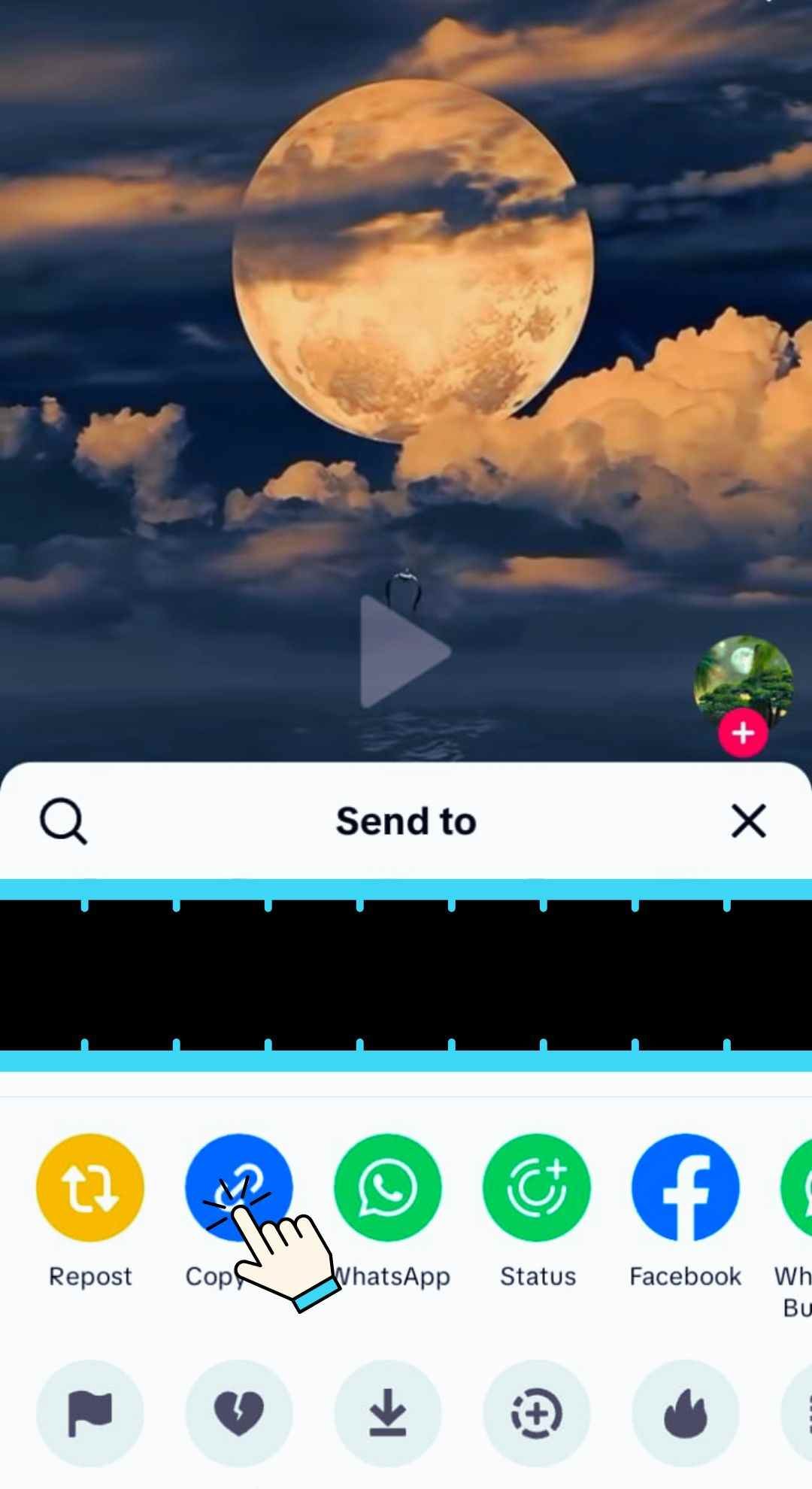
Copy the TikTok Video Link
Open TikTok on your mobile device or desktop browser and find the video you want to download. Tap the Share button, then choose "Copy Link" to save the video URL to your clipboard.
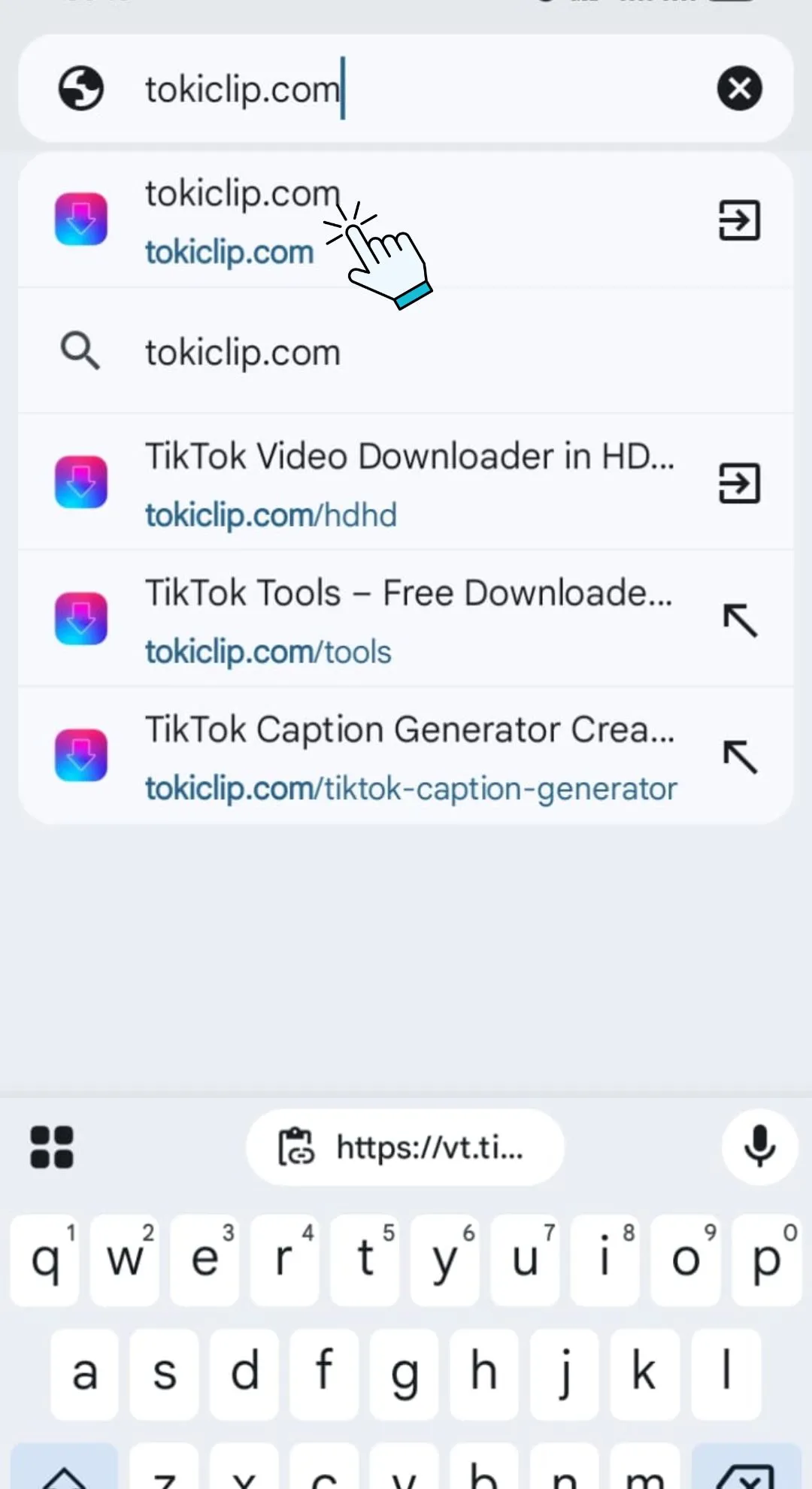
Open TokiClip in Your Browser
Launch any web browser such as Chrome, Safari or Firefox and go to tokiclip.com. There’s no need to install an app or create an account the tool works instantly online.
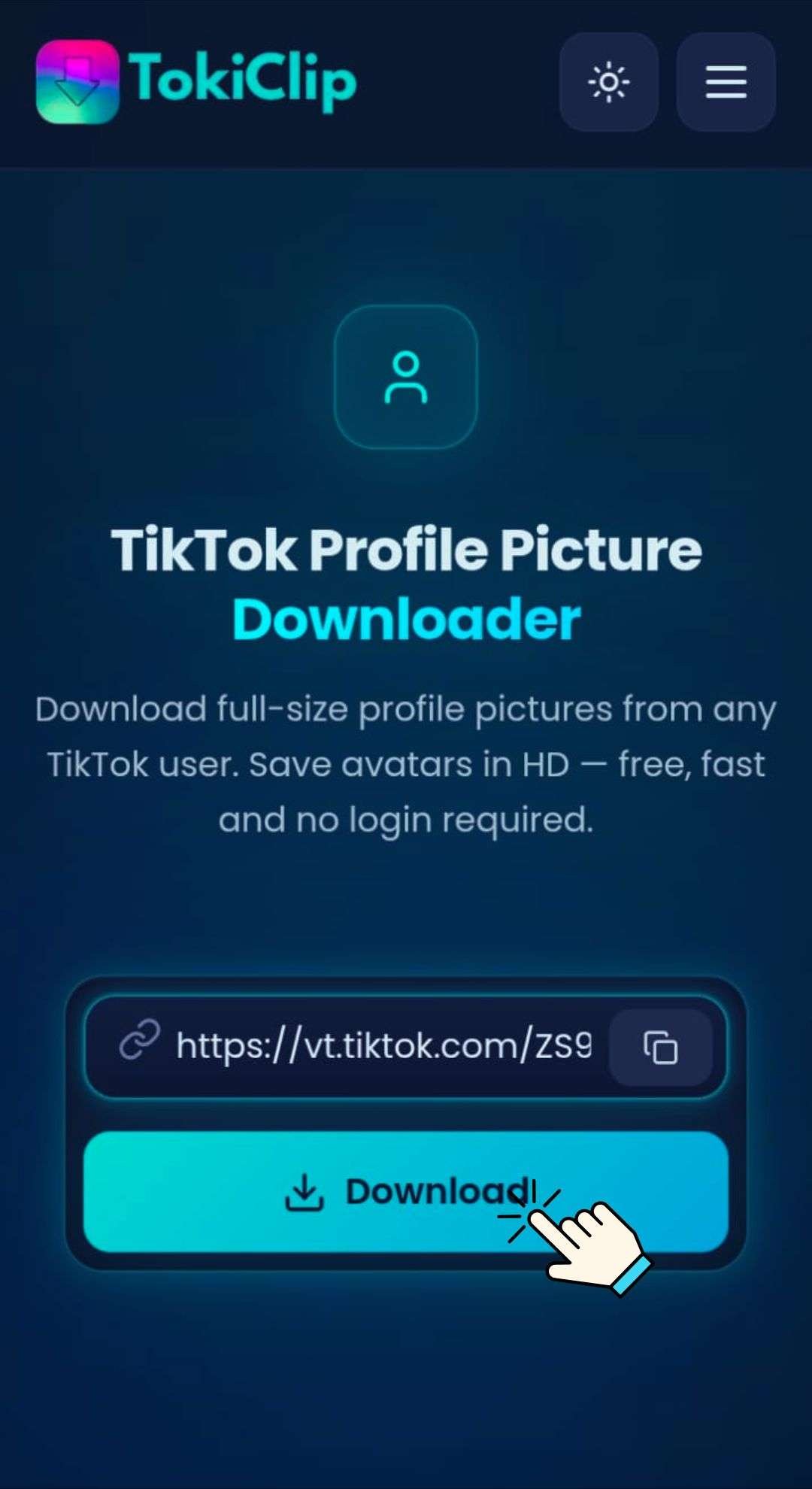
Paste into TokiClip
Open TokiClip and paste the copied link into the input field above, then click "Download".
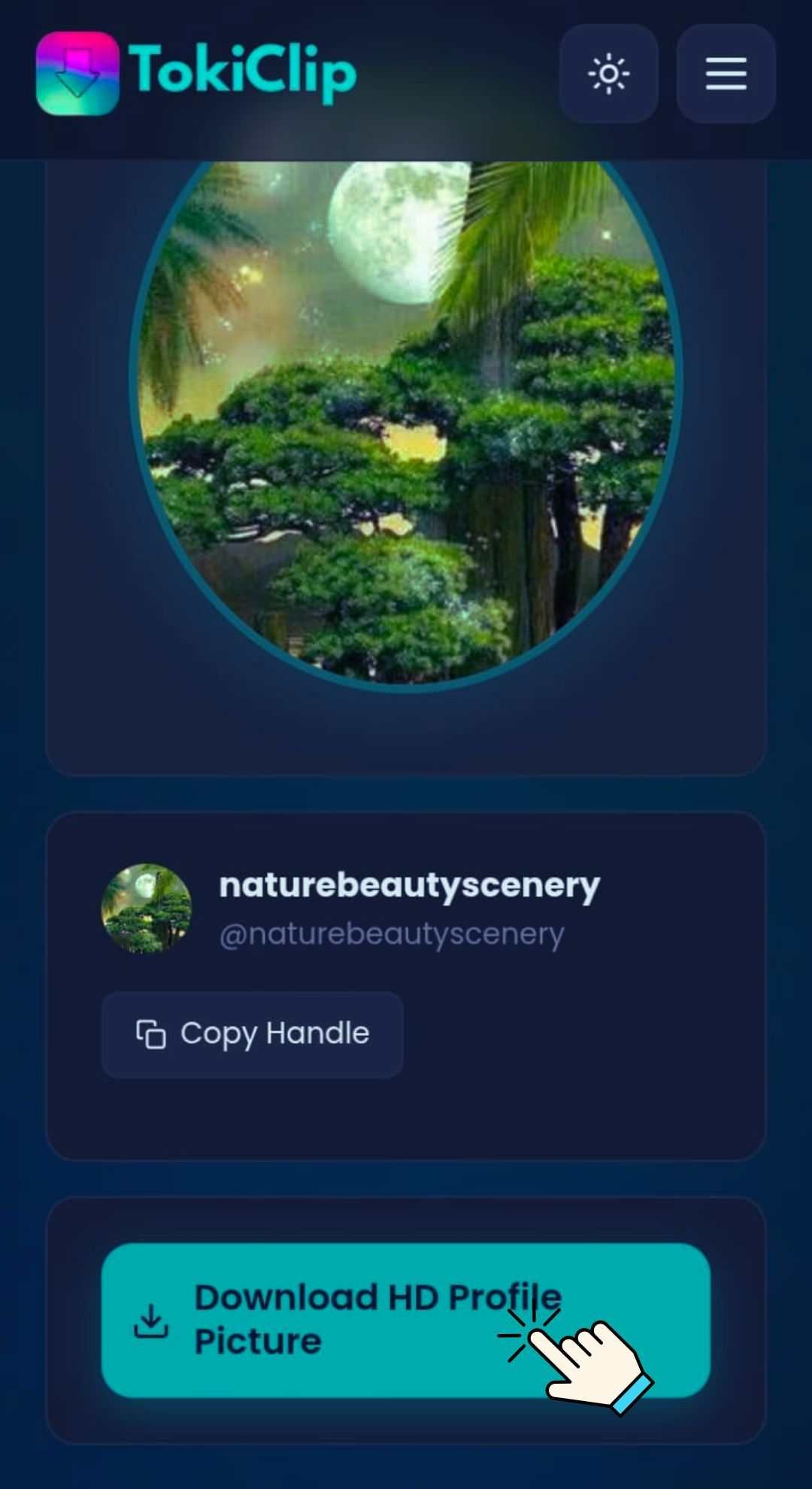
Download the Profile Picture
Preview the full-size avatar and click the Download button to save it to your device in HD quality.
Works on All Devices
Use TokiClip directly in your browser — no app installation required, on any device.
PC & Laptop
Open any browser, paste the TikTok link and save the profile picture directly to your device.
Android & iPhone
Copy the video link from the TikTok app, paste it in your mobile browser and download.
Tablet & iPad
Works seamlessly on tablets with any modern browser. No app installation required.
Safety & Privacy
Your privacy is our priority. TokiClip processes links securely without storing any user data.
No Data Collection
No personal information is collected or stored. Use the tool anonymously every single time.
Secure Connection
HTTPS encryption protects your browsing session from start to finish.
No Server Storage
Profile pictures are not stored on our servers. Temporary processing only — your file is gone the moment you have it.
Respect Creator Rights
Please respect privacy and intellectual property when downloading profile pictures. Use downloaded content for personal purposes only.
TikTok Profile Picture Downloader FAQ
Quick answers to the most common questions about saving TikTok avatars.
How do I download a TikTok profile picture?
What resolution is the profile picture?
Is it free to use?
Can I download profile pictures on my phone?
Do I need the user’s profile URL?
Profile picture not loading?
Can I download profile pictures from private accounts?
What format is the profile picture saved in?
More Free TikTok Tools
Everything else creators need — downloaders, AI generators and analytics, all free.
TikTok Video Downloader
Download TikTok videos in HD without watermark.
TikTok Audio Downloader
Extract MP3 audio from any TikTok video.
TikTok Photo Downloader
Download TikTok photo slideshow images in HD.
TikTok Thumbnail Downloader
Grab the cover thumbnail from any TikTok video.
TikTok Private Video Downloader
Save your own private TikTok videos.
TikTok Story Downloader
Download TikTok stories before they disappear.
TikTok Title Generator
Generate viral TikTok video titles with AI.
TikTok Caption Generator
Write engaging TikTok captions in seconds.
TikTok Hashtag Generator
Find trending TikTok hashtags for any niche.
TikTok Username Generator
Brainstorm catchy TikTok usernames with AI.
TikTok Username Search
Look up any TikTok user and view their stats.
TikTok Engagement Calculator
Estimate your TikTok engagement rate instantly.
TikTok Money Calculator
See how much TikTok creators earn per post.
TikTok Comment Picker
Run fair giveaways with random comment picking.
TikTok Comment Generator
Mock up TikTok comments for memes and demos.
TikTok Followers Generator
10 personalised, organic TikTok growth strategies for any niche.
TikTok Font Generator
Stylish unicode fonts for TikTok bios and captions.
TikTok QR Code Generator
Create a scannable QR code for your TikTok profile.