
TikTok Audio Downloader
Extract the original sound from any TikTok video as a clean MP3. Fast, free, and no login required.
What is a TikTok Audio Downloader?
Extract any sound, song or voiceover from a TikTok video and save it as a high-quality MP3 — no app, no sign-up, no watermark.
A TikTok Audio Downloader is an online tool designed to extract the audio track from any public TikTok video and save it as a high-quality MP3 file. Whether it's a viral sound, trending music clip, voiceover narration, or an original audio creation — you can download it directly to your device for offline listening, content creation, or personal use.
TikTok has become one of the largest platforms for discovering new music, sound effects, and audio trends. However, the app itself does not provide a built-in option to download just the audio from a video. This is where TokiClip's TikTok Audio Downloader comes in — it bridges that gap by allowing you to extract and save audio in seconds, without any software installation, account creation, or hidden fees.
Unlike screen recording or other workarounds that capture audio along with background noise and reduced quality, this tool directly extracts the original audio track at its source quality. The result is a clean, high-fidelity MP3 file that's compatible with virtually every media player, device, and operating system. Pair it with our TikTok Video Downloader when you also need the visuals, or grab cover art with the TikTok Thumbnail Downloader.
Why TikTok Audio Is Different from Video Downloads
Get only what you need — sound, not the full video file.
When you download a TikTok video, you get the full video file including visuals. But in many cases, users only need the audio — whether it's a catchy song, a podcast clip, a motivational speech, or a sound effect for their own content. Downloading the entire video just to extract the audio wastes storage space and requires additional editing tools.
A dedicated TikTok Audio Downloader eliminates these extra steps. It extracts only the audio track and delivers it in lightweight MP3 format, saving you time, storage, and effort. This makes it ideal for music lovers, content creators, podcasters, DJs, and anyone who wants quick access to TikTok sounds without the video component.
Who Can Benefit from This Tool?
From music lovers to creators and educators — anyone who needs TikTok sounds.
The TikTok Audio Downloader is useful for a wide range of people. Music enthusiasts can save trending songs and sounds for offline playlists. Content creators can extract audio clips for use in their own videos, podcasts, or social media posts. Students and educators can save informative audio content for study or reference purposes.
Social media managers can archive audio trends for campaign planning, while casual users can simply save their favorite TikTok sounds to listen to anytime. Looking to download other content? Try our Thumbnail Downloader, Story Downloader, or Photo Downloader.
Key Features of TikTok Audio Downloader
Everything you need to grab TikTok sounds — fast, free and crystal clear.
High Quality Audio
Extract audio from TikTok videos in crystal-clear MP3 quality.
Instant Conversion
Paste the TikTok link and get your MP3 file within seconds.
No Registration
No login or account needed. Start downloading audio immediately.
MP3 Format
All audio is extracted in universally supported MP3 format.
Background Music
Save trending TikTok sounds, songs and audio clips for offline listening.
All Devices Supported
Works on PC, Android, iPhone, and tablets — no app needed.
Unlimited Extractions
Convert as many TikTok videos to MP3 as you want, no limits.
Original Sound Quality
Preserves the original audio track without compression artifacts.
How to Download TikTok Audio
Save any TikTok sound as MP3 in just 4 easy steps. Works on iPhone, Android and PC — no app needed.
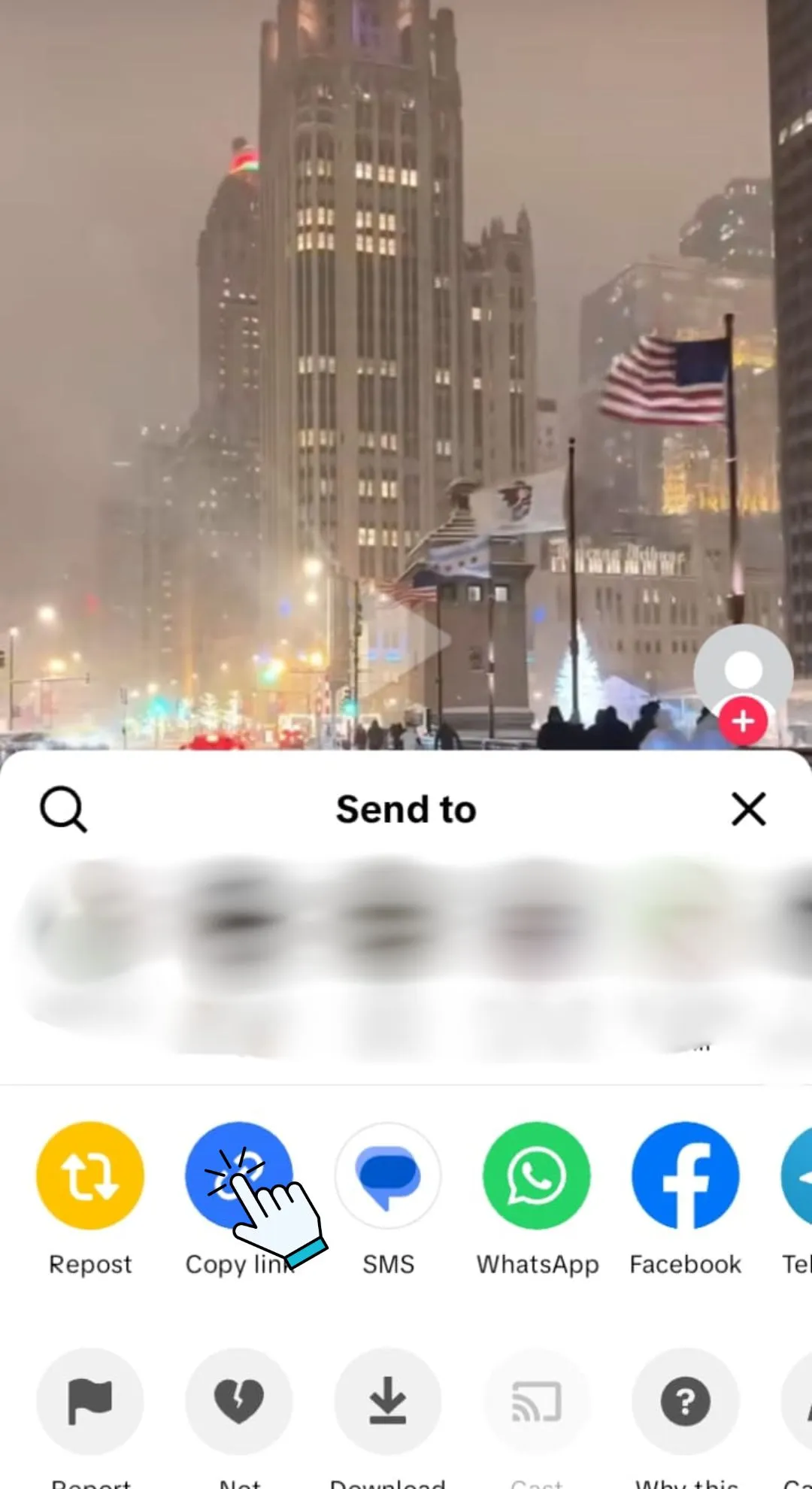
Find the TikTok Video
Open TikTok and find the video with the audio you want to save. Tap the Share button to copy the video link.
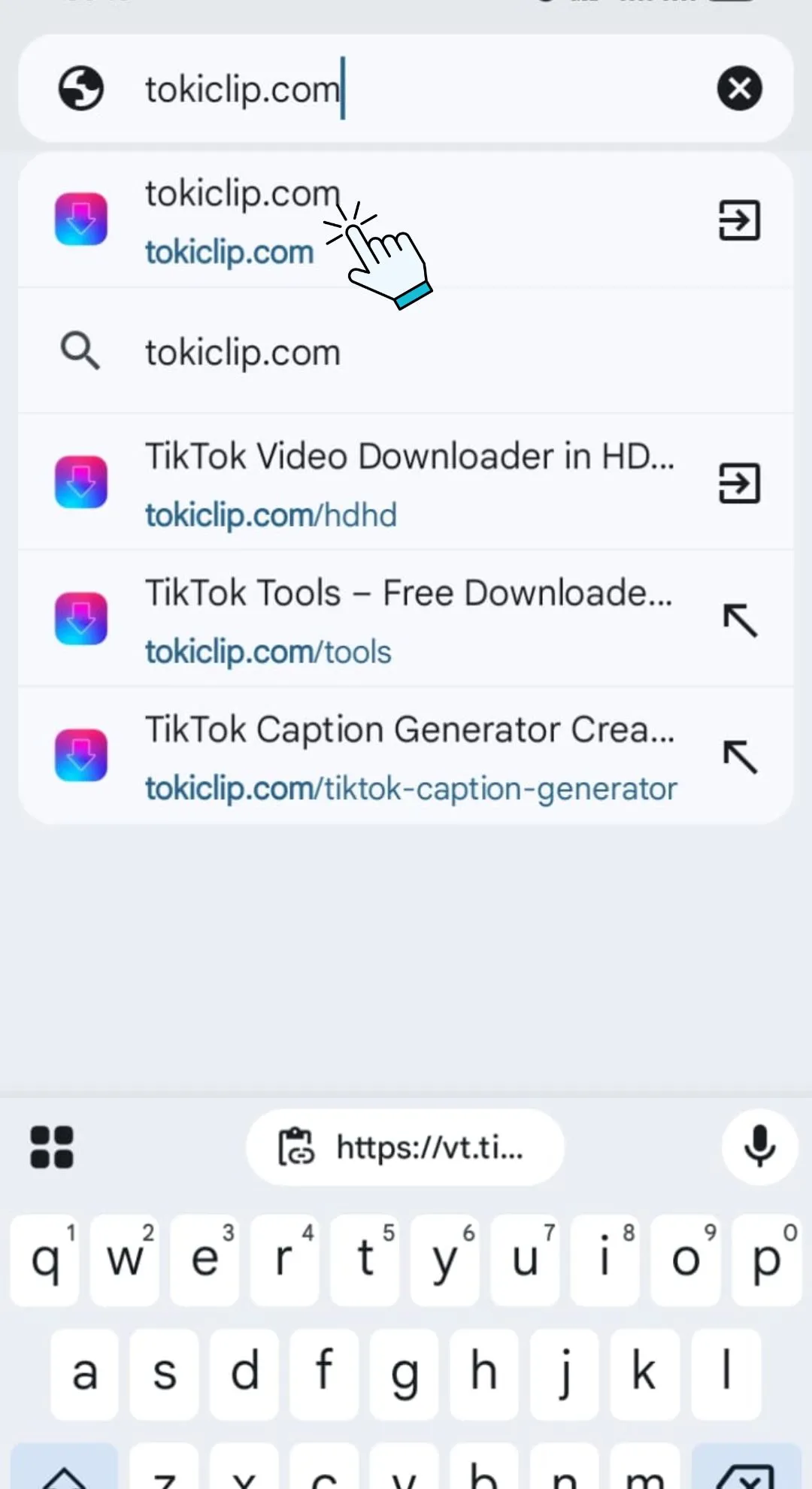
Open TokiClip in Your Browser
Open any browser like Chrome, Safari, or Firefox and visit tokiclip.com — no app download or registration needed.
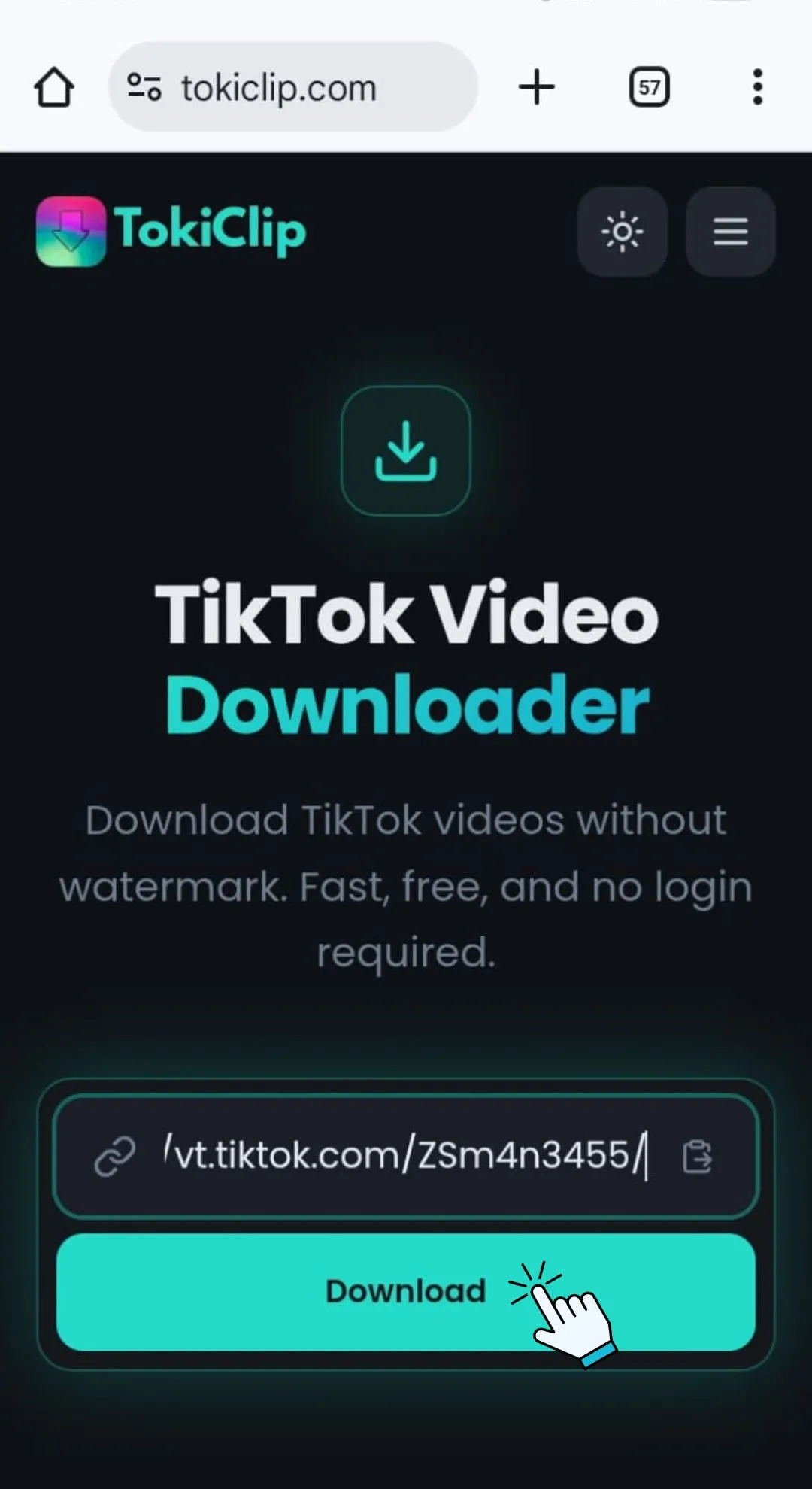
Paste the Link & Download
Paste the copied TikTok link into the input field above and click the Extract MP3 button. Your audio is processed instantly.
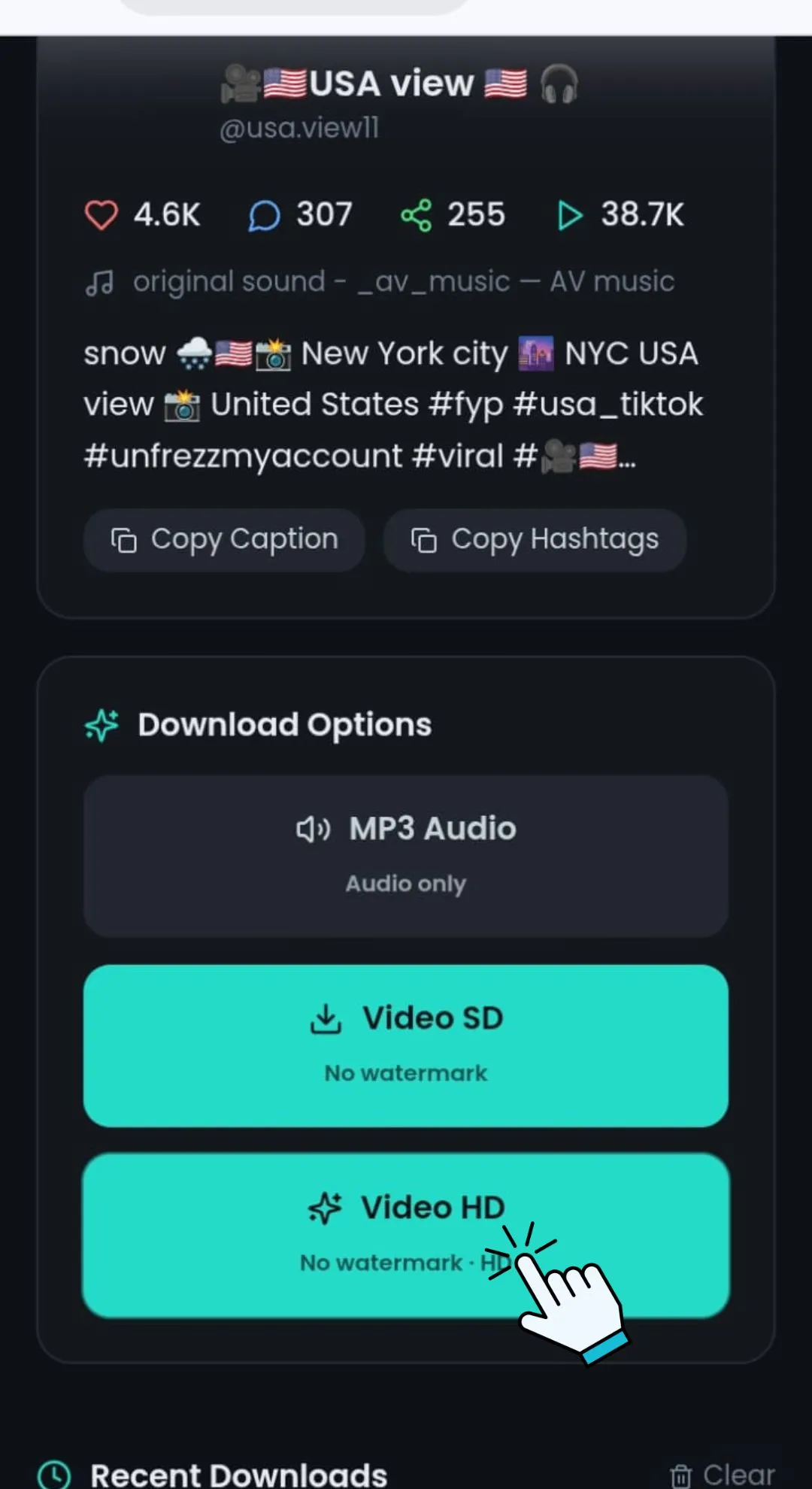
Select MP3 & Save Audio
Choose the MP3 audio option to extract and save the sound directly to your device — ready for offline listening anytime.
Download TikTok Audio on Any Device
TokiClip works directly in your browser — no app installation required, on any device.
PC & Laptop
Use any modern browser to extract and download TikTok audio instantly.
Android Devices
Copy the TikTok link and paste it into TokiClip using Chrome or your preferred browser.
iPhone & iPad
Use Safari or any browser to extract audio and save MP3 files directly to your device.
No app installation required. Extract TikTok audio directly through your browser.
Safety & Privacy
Your privacy is our priority. TokiClip processes links securely without storing any user data.
No Data Collection
No personal information is collected or stored. Use the tool anonymously every single time.
Secure Connection
HTTPS encryption protects your browsing session from start to finish.
No Server Storage
Audio files are not stored on our servers. Temporary processing only — your file is gone the moment you have it.
Respect Creator Rights
Please respect copyright and intellectual property when downloading audio. Use downloaded content for personal purposes only.
TikTok Audio Downloader FAQ
Quick answers to the most common questions about extracting TikTok audio.
How do I download audio from TikTok?
Can I download TikTok sounds as MP3?
Is the audio quality good?
Is it free to use?
Can I use the downloaded audio offline?
Does it work on iPhone?
Audio not downloading?
Can I extract audio from any TikTok video?
More Free TikTok Tools
Everything else creators need — downloaders, AI generators and analytics, all free.
TikTok Video Downloader
Download TikTok videos in HD without watermark.
TikTok Photo Downloader
Download TikTok photo slideshow images in HD.
TikTok Thumbnail Downloader
Grab the cover thumbnail from any TikTok video.
TikTok Profile Picture Downloader
Save any TikTok profile picture in full HD.
TikTok Private Video Downloader
Save your own private TikTok videos.
TikTok Story Downloader
Download TikTok stories before they disappear.
TikTok Title Generator
Generate viral TikTok video titles with AI.
TikTok Caption Generator
Write engaging TikTok captions in seconds.
TikTok Hashtag Generator
Find trending TikTok hashtags for any niche.
TikTok Username Generator
Brainstorm catchy TikTok usernames with AI.
TikTok Username Search
Look up any TikTok user and view their stats.
TikTok Engagement Calculator
Estimate your TikTok engagement rate instantly.
TikTok Money Calculator
See how much TikTok creators earn per post.
TikTok Comment Picker
Run fair giveaways with random comment picking.
TikTok Comment Generator
Mock up TikTok comments for memes and demos.
TikTok Followers Generator
10 personalised, organic TikTok growth strategies for any niche.
TikTok Font Generator
Stylish unicode fonts for TikTok bios and captions.
TikTok QR Code Generator
Create a scannable QR code for your TikTok profile.